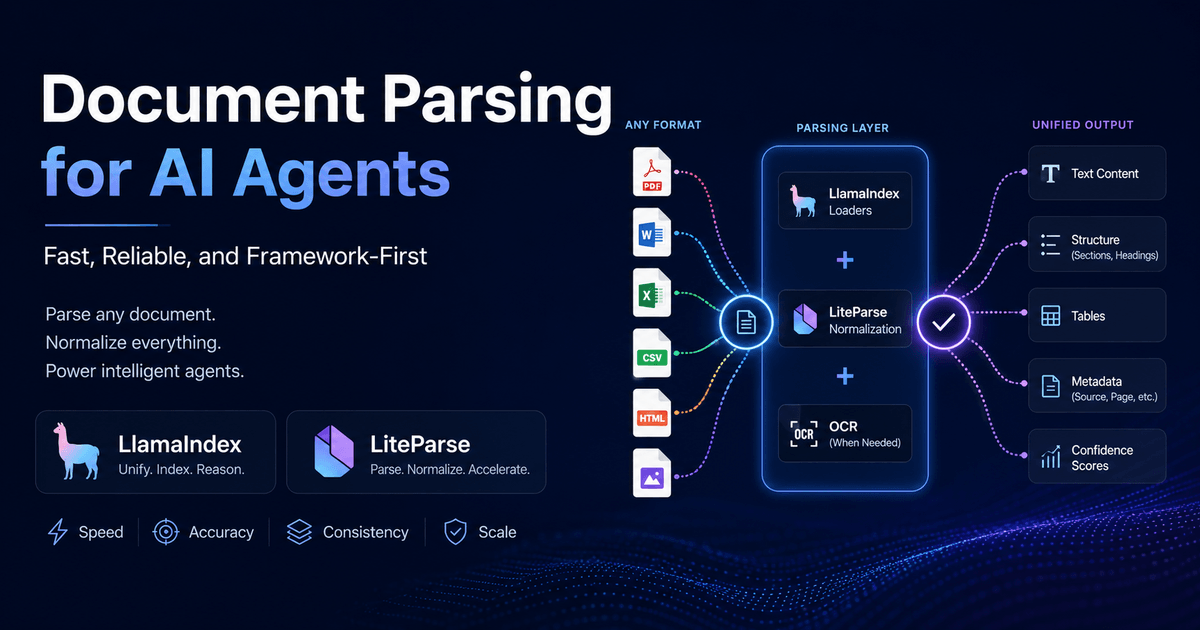
In 2026, the bottleneck in most agentic pipelines isn't the LLM. It's the 47-page PDF it can't read correctly.
Six months into building an internal document intelligence system, we had a parsing pipeline that looked fine in staging. It processed PDFs, extracted text, chunked it, embedded it. The retrieval scores were acceptable. Then we started running it against our actual document library - quarterly financial reports, scanned vendor invoices, multi-column regulatory filings. Six weeks later, we found 200+ corrupted chunks in the vector store. The financial tables had been silently mangled: merged cells collapsed into single values, column headers detached from their data, multi-line entries concatenated without separator. The agent downstream was answering questions about revenue using garbage. Not hallucinating - retrieving accurately from corrupted source material. The parser had succeeded technically and failed operationally. That experience is what this article is built on.
Document parsing is an orchestration problem, not an implementation problem. The question is not which tool extracts text best in isolation - it is which combination of tools reliably transforms heterogeneous inputs into a consistent structure that downstream agents can reason over. And the answer has changed significantly in the last eighteen months. Documents are no longer treated as files to be read. They are treated as multimodal artifacts - combinations of text, spatial layout, tables, charts, images, and implicit relational structure - to be semantically reconstructed. The parsers that win in 2026 benchmarks win because they use vision-language models to rebuild meaning, not because they have better character-extraction logic. That shift changes everything about how you pick a tool.
Part I: The Landscape Has Shifted
Benchmarks first - and their limits
The two most-cited benchmarks in this space are ParseBench (LlamaIndex, 2026) and SCORE-Bench (Unstructured, 2025). Before trusting either, note what they are: ParseBench was built and published by the team that sells LlamaParse. SCORE-Bench was built and published by Unstructured. There is no independent neutral benchmark for document parsing yet - the equivalent of MLPerf for inference or SWE-bench for coding agents does not exist here. Treat both as directional signals rather than verdicts, and weight them accordingly.
ParseBench is the more methodologically transparent of the two. It tests approximately 2,000 human-verified enterprise pages drawn from insurance, financial services, and government documents across five distinct dimensions: table structure recognition, chart understanding, content fidelity, semantic formatting preservation, and visual grounding. No tool tested wins on all five dimensions. That is the main finding - and it has more practical weight than any individual accuracy number.
What parsing now costs
Cost per page varies by three orders of magnitude across the field. Open-source local tools cost nothing beyond compute. Cloud agentic parsers running vision-language inference can reach $0.056 per page for the most capable modes. At 10 million pages per month - a number any mid-market enterprise document workflow reaches quickly - that difference is $560,000 in monthly variable cost versus near-zero. The routing decision is a financial architecture decision, not just a tooling preference.
Speed at the ingestion layer
For synchronous document ingestion, throughput limits pipeline latency. PyMuPDF processes roughly 10 pages per second on commodity hardware - fast enough that a 200-page annual report arrives in the downstream agent in under 30 seconds. Cloud parsers are bounded by API response time, not compute: LlamaParse typically returns results in 5 to 20 seconds per document depending on complexity, making it unsuitable for real-time ingestion paths but acceptable for batch workflows.
Landscape at a glance
| Tool | Best benchmark signal | Cost/page | Local | Open source | VLM-backed | Best for |
|---|---|---|---|---|---|---|
| LiteParse | 100x faster than pure-Python (claimed) | Free | Yes | MIT | No | Speed-critical local ingestion, 50+ formats |
| LlamaParse | 84.9% (ParseBench overall) | 0.4¢ - 5.6¢ | No | No | Yes | Complex multi-modal documents, RAG pipelines |
| Unstructured | 88.3% CCT (SCORE-Bench) | 3¢ | Partial | Eval only | Yes | Enterprise connectors, mixed-format ingestion |
| Docling | TEDS 0.97 on FinTabNet tables | Free | Yes | MIT | Yes (local) | Financial tables, air-gapped environments |
| PyMuPDF | ~10 pages/sec throughput | Free | Yes | AGPL | No | Latency-critical digital-native PDF extraction |
| Google Document AI | ~95%+ on prebuilt processors | ~1.5¢ | No | No | Yes | 200+ prebuilt form types, Vertex AI integration |
| Azure DI | 99%+ on prebuilt models | 1.5¢ - 10¢ | No | No | Yes | Compliance, audit trail, regulated industries |
| AWS Textract | 82% invoice line-item accuracy | 0.15¢ - 6.5¢ | No | No | Partial | AWS-native pipelines, invoice and ID extraction |
Part II: Tool Deep-Dives
2.1 LiteParse
LiteParse is the open-source parser from the LlamaIndex team, rewritten in Rust in version 2.0. It is model-free: no LLM inference, no cloud call, no API key. The value proposition is simple - if your documents are digital-native and you need to process them at volume with minimal marginal cost, LiteParse gives you a consistent normalisation layer across 50+ formats without the latency or expense of a cloud pipeline. It integrates natively with LlamaIndex's document node abstraction.
from liteparse import Parser
parser = Parser()result = parser.parse("annual_report.pdf")
for node in result.nodes:    print(f"[{node.metadata.get('page', '?')}] {node.text[:120]}")
# Batch mode for directoriesfrom pathlib import Path
docs = [str(p) for p in Path("./contracts/").glob("*.pdf")]results = [parser.parse(doc) for doc in docs]all_nodes = [node for r in results for node in r.nodes]print(f"Ingested {len(docs)} documents → {len(all_nodes)} nodes")
One constraint worth noting: LiteParse's strength is digital-native documents. For scanned PDFs it falls back to Tesseract OCR, which is accurate enough for clean scans but struggles with degraded images, handwriting, and rotated content. If your document library is more than 20% scanned pages, LiteParse alone is not sufficient - you need a routing layer that escalates those documents to a more capable OCR or VLM backend.
2.2 LlamaParse
LlamaParse is the cloud parser from LlamaIndex, positioned at the opposite end of the tradeoff space from LiteParse. It uses vision-language models to semantically reconstruct documents rather than extract characters. The agentic mode - which scored 84.9% on ParseBench across 2,000 enterprise pages - applies multi-step VLM reasoning to extract tables, charts, and complex layouts. The output is clean markdown with heading hierarchy preserved, which directly improves chunking quality downstream: a retrieval system that chunks on heading boundaries finds more semantically coherent passages than one chunking on character count.
from llama_parse import LlamaParsefrom llama_index.core import VectorStoreIndex, SimpleDirectoryReader
parser = LlamaParse(    result_type="markdown",    use_vendor_multimodal_model=True,    # Agentic mode - most accurate, 10 credits/page    parsing_instruction=(        "Extract all tables preserving row/column structure. "        "Identify section headings and maintain hierarchy. "        "Flag any charts or figures with [CHART: description]."    ),)
file_extractor = {".pdf": parser, ".docx": parser, ".pptx": parser}documents = SimpleDirectoryReader(    "./data", file_extractor=file_extractor).load_data()
index = VectorStoreIndex.from_documents(documents)query_engine = index.as_query_engine()
response = query_engine.query(    "What was the gross margin in Q3 and how did it compare to Q2?")print(response)
Two operational limits: LlamaParse Agentic times out on documents above roughly 200 pages in a single API call - split long documents before submission. And the 48-hour cache means re-parsing the same document within two days is free, which matters for development iteration but should not be relied on as a cost model in production.
2.3 Unstructured.io
Unstructured is the enterprise-tier option in the open-source-adjacent space. The platform positions itself as an end-to-end pipeline rather than a parser: it handles 70+ document types, integrates with S3, SharePoint, Confluence, Salesforce, and dozens of other source connectors, and outputs structured element trees (Title, NarrativeText, Table, Image, Header) rather than raw text. On SCORE-Bench - its own benchmark against 1,000+ expert-annotated enterprise pages - it achieved an adjusted CCT of 0.883 using its VLM partitioner.
from unstructured.partition.auto import partitionfrom unstructured.staging.base import elements_to_jsonfrom unstructured.documents.elements import Table, Title, NarrativeText
elements = partition(    filename="q4_earnings_report.pdf",    strategy="hi_res",           # VLM-backed, slowest but most accurate    infer_table_structure=True,  # reconstruct table HTML    languages=["eng"],)
# Inspect element typesfor el in elements[:10]:    print(f"{el.category:20s} | {str(el)[:80]}")
# Extract only tables as structured JSONtables = [e for e in elements if isinstance(e, Table)]print(f"Found {len(tables)} tables")print(elements_to_json(tables, indent=2))
The hi_res strategy is the correct choice for enterprise documents but it is slow - roughly 0.8 pages per second. For high-volume ingestion, use the fast strategy for digital-native documents and hi_res only for documents flagged as complex or scanned. Unstructured's API pricing at $0.03 per page is the most expensive open-access tier in the market; the self-hosted option requires a paid enterprise license.
2.4 Docling (IBM)
Docling is IBM's open-source document conversion library, MIT-licensed, trained on approximately 81,000 labeled pages. It runs entirely locally and produces clean markdown or JSON output. On IBM's own evaluation against the FinTabNet benchmark - a dataset of financial tables from S&P 500 annual reports - Docling achieved a TEDS score of 0.97 after recent model improvements. TEDS (Tree Edit Distance-based Similarity) measures table structure reconstruction fidelity: a score of 0.97 means the reconstructed table structure differs from ground truth by only 3% on average across a challenging financial document set. For pipelines that need accurate financial table extraction without cloud dependency, Docling is the strongest open-source option available.
from docling.document_converter import DocumentConverterfrom docling.datamodel.base_models import InputFormatfrom docling.datamodel.pipeline_options import PdfPipelineOptions
pipeline_options = PdfPipelineOptions()pipeline_options.do_ocr = True       # enable OCR for mixed digital/scannedpipeline_options.do_table_structure = True
converter = DocumentConverter(    allowed_formats=[InputFormat.PDF, InputFormat.DOCX, InputFormat.XLSX],    pdf_options=pipeline_options,)
result = converter.convert("portfolio_companies_2025.pdf")
# Export to markdown (preserves heading hierarchy)markdown = result.document.export_to_markdown()
# Export to structured JSONdoc_json = result.document.export_to_dict()tables = [item for item in doc_json.get("items", []) if item.get("label") == "table"]print(f"Extracted {len(tables)} tables with TEDS-optimised structure")
2.5 PyMuPDF4LLM
PyMuPDF is the speed benchmark for document parsing. The C-based library processes roughly 10 pages per second on commodity hardware and returns markdown-formatted text with layout-aware chunking. At 10 pages per second, a 200-page annual report completes in under 25 seconds without any network call. The LLM-optimised wrapper (pymupdf4llm) adds heading detection and table formatting on top of raw extraction. For latency-critical pipelines - where a document arrives and an agent must respond within seconds - PyMuPDF is the only viable option at the local tier.
import pymupdf4llmfrom pathlib import Path
# Basic extraction - returns markdown stringmd_text = pymupdf4llm.to_markdown("board_deck_q2.pdf")
# Page-level extraction with metadatapages = pymupdf4llm.to_markdown(    "board_deck_q2.pdf",    page_chunks=True,         # returns list of dicts, one per page    write_images=False,       # skip image extraction for speed    show_progress=False,)
for page in pages[:3]:    print(f"Page {page['metadata']['page']}: {len(page['text'])} chars")
# Targeted extraction: specific page rangessubset = pymupdf4llm.to_markdown(    "board_deck_q2.pdf",    pages=[0, 1, 2],          # cover + exec summary only    page_chunks=True,)print(f"Extracted {len(subset)} pages in targeted mode")
The tradeoff is fidelity on complex layouts. PyMuPDF reads embedded text coordinates and reconstructs reading order heuristically. On single-column documents with simple tables, this is excellent. On multi-column academic papers, complex financial layouts with spanning cells, or any scanned content, it degrades. PyMuPDF belongs in the fast tier of your routing architecture, not as the sole parser for a heterogeneous document library.
2.6 Google Document AI
Google Document AI is the most widely deployed enterprise document parser in production by page volume, processing billions of pages annually across Google Workspace, Google Cloud customers, and internal systems. It offers 200+ specialized processors - purpose-built models for invoices, receipts, contracts, payslips, driver's licenses, tax forms, and more - each fine-tuned on domain-specific training data. On standard enterprise document types within its prebuilt processor coverage, it achieves approximately 95%+ field extraction accuracy. The native integration with Vertex AI pipelines, BigQuery, and Google Cloud Storage makes it the obvious choice for teams already operating on GCP.
from google.cloud import documentaifrom google.api_core.client_options import ClientOptions
project_id = "your-project-id"location = "us"processor_id = "your-processor-id"   # e.g. invoice processor
opts = ClientOptions(api_endpoint=f"{location}-documentai.googleapis.com")client = documentai.DocumentProcessorServiceClient(client_options=opts)name = client.processor_path(project_id, location, processor_id)
with open("vendor_invoice_2025_q4.pdf", "rb") as f:    raw_document = documentai.RawDocument(        content=f.read(),        mime_type="application/pdf",    )
request = documentai.ProcessRequest(name=name, raw_document=raw_document)result = client.process_document(request=request)document = result.document
# Extract structured fields with confidence scoresfor entity in document.entities:    print(        f"{entity.type_:30s} | "        f"{entity.mention_text:40s} | "        f"confidence: {entity.confidence:.2%}"    )
# Access page-level text with layout informationfor page in document.pages:    for block in page.blocks:        vertices = [(v.x, v.y) for v in block.layout.bounding_poly.vertices]        text_anchor = block.layout.text_anchor        block_text = document.text[            text_anchor.text_segments[0].start_index:            text_anchor.text_segments[0].end_index        ]        print(f"Block at {vertices[0]}: {block_text[:60]}")
One gap: Google Document AI's handwriting processor is separate from its printed-text processors. Mixed documents - printed forms with handwritten annotations - require routing through both processors and merging results. This is rarely documented clearly and is the most common source of incomplete extraction in legal and medical document workflows.
2.7 Azure Document Intelligence
Azure Document Intelligence (formerly Form Recognizer) covers 30+ prebuilt models across invoices, receipts, identity documents, tax forms, contracts, and more. On its prebuilt model set, Microsoft reports 99%+ field extraction accuracy. The compliance story is the strongest in the market: Azure DI supports SOC 2, ISO 27001, HIPAA, and GDPR, making it the default choice for regulated industries in Europe and North America. Version 4.0 added figure extraction, semantic chunking, and improved multi-page table handling. For any pipeline where auditability is a requirement, Azure DI generates a structured JSON response that can be logged verbatim as evidence of extraction.
from azure.ai.documentintelligence import DocumentIntelligenceClientfrom azure.ai.documentintelligence.models import AnalyzeDocumentRequestfrom azure.core.credentials import AzureKeyCredential
endpoint = "https://your-resource.cognitiveservices.azure.com/"key = "your-api-key"
client = DocumentIntelligenceClient(endpoint, AzureKeyCredential(key))
with open("regulatory_filing_2025.pdf", "rb") as f:    poller = client.begin_analyze_document(        "prebuilt-layout",    # use prebuilt-invoice, prebuilt-contract etc for domain        analyze_request=f,        content_type="application/octet-stream",        output_content_format="markdown",  # v4.0: direct markdown output    )
result = poller.result()
# Extract all tables with cell-level confidencefor table_idx, table in enumerate(result.tables):    print(f"Table {table_idx}: {table.row_count} rows x {table.column_count} cols")    for cell in table.cells:        print(f"  [{cell.row_index},{cell.column_index}] {cell.content}")
# Named field extraction (for domain-specific prebuilt models)if result.documents:    for field_name, field in result.documents[0].fields.items():        if field.value_string:            print(f"{field_name}: {field.value_string} ({field.confidence:.2%})")
Part III: What Parsers Actually Return
Benchmark scores tell you one thing. The raw output your agent receives tells you something more important: whether the downstream chunking strategy you have built will work with this parser's output format. The same source document - a paragraph followed by a financial table - produces structurally different representations across tools. That difference determines chunking quality, retrieval precision, and ultimately agent accuracy.
Source document used below: one paragraph of narrative text followed by a four-column revenue table (Q1-Q4, three business units).
LlamaParse Agentic output:
## Revenue Performance by Business Unit
Group revenue grew 18% year-on-year in FY2025, driven primarily bystrong performance in the Enterprise segment and margin expansionin Professional Services.
| Business Unit   | Q1 (£M) | Q2 (£M) | Q3 (£M) | Q4 (£M) ||-----------------|---------|---------|---------|---------|| Enterprise      | 12.4    | 13.1    | 14.8    | 16.2    || SMB             | 4.2     | 4.0     | 3.9     | 4.5     || Prof. Services  | 2.1     | 2.3     | 2.4     | 2.8     || **Total**       | **18.7**| **19.4**| **21.1**| **23.5**|
Docling output:
## Revenue Performance by Business Unit
Group revenue grew 18% year-on-year in FY2025, driven primarily bystrong performance in the Enterprise segment and margin expansionin Professional Services.
|Business Unit|Q1 (£M)|Q2 (£M)|Q3 (£M)|Q4 (£M)||---|---|---|---|---||Enterprise|12.4|13.1|14.8|16.2||SMB|4.2|4.0|3.9|4.5||Prof. Services|2.1|2.3|2.4|2.8||Total|18.7|19.4|21.1|23.5|
PyMuPDF4LLM output:
Revenue Performance by Business Unit
Group revenue grew 18% year-on-year in FY2025, driven primarily by strong performance in theEnterprise segment and margin expansion in Professional Services.
Business Unit Q1 (£M) Q2 (£M) Q3 (£M) Q4 (£M)Enterprise 12.4 13.1 14.8 16.2SMB 4.2 4.0 3.9 4.5Prof. Services 2.1 2.3 2.4 2.8Total 18.7 19.4 21.1 23.5
The practical consequence: LlamaParse and Docling outputs can be chunked at heading boundaries using standard markdown parsers, giving the retrieval system semantically coherent passages. PyMuPDF's plain-text output flattens the heading into body text and removes table structure, which means character-count chunking will split the table arbitrarily - potentially separating "Q3 (£M)" from its values. An agent asked "what was Enterprise revenue in Q3?" retrieving a PyMuPDF-chunked passage may receive a chunk containing only the header row, not the data. This is the output contract problem: the right parser choice depends on what your agent does with the output, not just on extraction accuracy scores.
Part IV: Silent Failure Modes
The most operationally damaging parser failures are not crashes or errors. They are cases where the parser returns something that looks correct but isn't - and the retrieval system indexes it faithfully, poisoning every downstream query that touches that content. These are the failure modes that took six weeks to surface in the pipeline I described at the start. None of them appeared in any benchmark study.
| Tool | Silent failure mode | Detection strategy | Mitigation |
|---|---|---|---|
| PyMuPDF | Garbled Unicode on CJK PDFs; ligature characters (fi, fl, ffi) silently dropped or rendered as □ | Compare character count pre/post extraction; scan output for replacement characters (U+FFFD, □) | Route CJK or ligature-heavy documents to Docling or cloud OCR |
| LlamaParse | Hallucinates merged table cells on complex spanning layouts; reconstructed values may not match source | Cross-check row and column counts against source PDF metadata; validate numeric sums | Use strict_mode=True; add post-parse numeric validation for financial tables |
| Docling | Misses reading order on multi-column academic papers; left and right columns interleaved | Test on representative multi-column samples; check that paragraph sequence is coherent | Force single-column mode for academic PDFs; or route to LlamaParse for layout-complex sources |
| Unstructured | Categorises section headers as NarrativeText in dense technical documents, losing structure signal | Inspect element category distribution on representative sample pages | Use hi_res strategy; enable infer_table_structure=True; post-process with heading classifier |
| Google Document AI | Misses handwritten annotations on printed forms when using printed-text processor | Test with mixed printed/handwritten samples before production rollout | Route to handwriting-specific processor; merge results from both processors for hybrid documents |
| Azure DI | Incorrect field mapping on non-standard invoice layouts; custom fields labelled as nearest prebuilt equivalent | Run against a validation set of atypical documents, not just standard invoice formats | Fine-tune with custom extraction model using labeled examples of non-standard layouts |
The underlying pattern is consistent across all six cases: the parser was evaluated on documents it handles well and deployed against a broader population that included documents it handles poorly. Every production deployment needs a validation set that represents the tail of the document distribution, not just the happy path. Build that set before you choose a parser, not after you find corrupted chunks.
Part V: The Orchestration Layer
The right mental model is not "pick the best parser." It is "build a routing layer that sends each document to the cheapest parser capable of handling it correctly." Most documents in a typical enterprise library are digital-native PDFs or Office files that PyMuPDF or LiteParse handles well at near-zero cost. A minority are scanned, multi-modal, or structurally complex and need a VLM-backed tool. A smaller minority require compliance-grade processing with an audit trail. The economics only work if you route correctly.
The following orchestrator implements the routing logic with three additions that production systems require but tutorials omit: a robust scanned-page detector that samples multiple pages rather than trusting the first, structured logging with input hashes for post-hoc debugging, and an async batch interface for concurrent document processing.
import asyncioimport hashlibimport timeimport loggingfrom dataclasses import dataclass, fieldfrom enum import Enumfrom pathlib import Pathfrom typing import Optional
logger = logging.getLogger(__name__)

class ParserTier(Enum):    LOCAL_FAST = "local_fast"          # PyMuPDF: digital PDFs, latency-critical    LOCAL_ACCURATE = "local_accurate"  # Docling: tables, financial, air-gapped    CLOUD_AGENTIC = "cloud_agentic"   # LlamaParse: complex, multi-modal    CLOUD_MANAGED = "cloud_managed"   # Azure DI / Google Doc AI: compliance

@dataclassclass ParsedDocument:    text: str    tables: list[dict]    metadata: dict    source: str    parser_used: str    confidence: Optional[float] = None    parse_latency_ms: float = 0.0    input_hash: str = ""

class DocumentParserOrchestrator:    """Routes documents to the appropriate parser tier based on format and SLA.
    Tier selection priority:      1. compliance_mode → always CLOUD_MANAGED      2. simple formats (.txt, .md, .csv) → LOCAL_FAST      3. scanned pages detected + cloud available → CLOUD_AGENTIC      4. all other complex formats → LOCAL_ACCURATE    """
    FAST_FORMATS = {".txt", ".md", ".html", ".csv", ".json"}
    def __init__(self, use_cloud: bool = True, compliance_mode: bool = False):        self.use_cloud = use_cloud        self.compliance_mode = compliance_mode
    def _input_hash(self, path: Path) -> str:        """SHA-256 of file content, first 16 chars - stable identifier for debugging."""        return hashlib.sha256(path.read_bytes()).hexdigest()[:16]
    def _detect_scanned(self, path: Path) -> bool:        """Sample first 5 pages using block-count heuristic.
        Checking only page 0 produces false positives on documents with        image-only cover pages or blank introductory pages. Sampling 5 pages        and counting text blocks is more reliable for mixed-content PDFs.        """        if path.suffix.lower() != ".pdf":            return False        import pymupdf        doc = pymupdf.open(str(path))        sample_count = min(len(doc), 5)        total_blocks = sum(            len(doc[i].get_text("dict").get("blocks", []))            for i in range(sample_count)        )        return total_blocks == 0
    def _select_tier(self, path: Path, has_scanned_pages: bool) -> ParserTier:        if self.compliance_mode:            return ParserTier.CLOUD_MANAGED        if path.suffix.lower() in self.FAST_FORMATS:            return ParserTier.LOCAL_FAST        if has_scanned_pages and self.use_cloud:            return ParserTier.CLOUD_AGENTIC        return ParserTier.LOCAL_ACCURATE
    def parse(self, file_path: str) -> ParsedDocument:        path = Path(file_path)        input_hash = self._input_hash(path)        has_scanned = self._detect_scanned(path)        tier = self._select_tier(path, has_scanned)
        t0 = time.perf_counter()        result = self._dispatch(path, tier)        result.parse_latency_ms = (time.perf_counter() - t0) * 1000        result.input_hash = input_hash
        logger.info(            "document_parsed",            extra={                "input_hash": input_hash,                "tier": tier.value,                "latency_ms": round(result.parse_latency_ms, 1),                "pages": result.metadata.get("pages"),                "source": str(path.name),            },        )        return result
    def _dispatch(self, path: Path, tier: ParserTier) -> ParsedDocument:        handlers = {            ParserTier.LOCAL_FAST: self._parse_pymupdf,            ParserTier.LOCAL_ACCURATE: self._parse_docling,            ParserTier.CLOUD_AGENTIC: self._parse_llamaparse,            ParserTier.CLOUD_MANAGED: self._parse_azure,        }        return handlers[tier](path)
    def _parse_pymupdf(self, path: Path) -> ParsedDocument:        import pymupdf4llm        text = pymupdf4llm.to_markdown(str(path))        return ParsedDocument(            text=text, tables=[], metadata={"parser": "pymupdf"},            source=str(path), parser_used="pymupdf",        )
    def _parse_docling(self, path: Path) -> ParsedDocument:        from docling.document_converter import DocumentConverter        result = DocumentConverter().convert(str(path))        return ParsedDocument(            text=result.document.export_to_markdown(),            tables=[],            metadata={"parser": "docling"},            source=str(path),            parser_used="docling",        )
    def _parse_llamaparse(self, path: Path) -> ParsedDocument:        from llama_parse import LlamaParse        parser = LlamaParse(result_type="markdown", use_vendor_multimodal_model=True)        docs = parser.load_data(str(path))        return ParsedDocument(            text="
".join(d.text for d in docs),            tables=[], metadata={"parser": "llamaparse"},            source=str(path), parser_used="llamaparse",        )
    def _parse_azure(self, path: Path) -> ParsedDocument:        import os        from azure.ai.documentintelligence import DocumentIntelligenceClient        from azure.core.credentials import AzureKeyCredential        client = DocumentIntelligenceClient(            os.environ["AZURE_DI_ENDPOINT"],            AzureKeyCredential(os.environ["AZURE_DI_KEY"]),        )        with open(path, "rb") as f:            poller = client.begin_analyze_document(                "prebuilt-layout", analyze_request=f,                content_type="application/octet-stream",                output_content_format="markdown",            )        result = poller.result()        return ParsedDocument(            text=result.content, tables=[],            metadata={"parser": "azure-di"},            source=str(path), parser_used="azure-di",        )

async def parse_batch(    paths: list[str],    orchestrator: DocumentParserOrchestrator,) -> list[ParsedDocument | Exception]:    """Fan-out document parsing concurrently.
    Uses asyncio.to_thread so each synchronous parser runs in the thread pool    without blocking the event loop. Return exceptions rather than raising so    one failed document doesn't abort the batch.    """    tasks = [asyncio.to_thread(orchestrator.parse, p) for p in paths]    return await asyncio.gather(*tasks, return_exceptions=True)

# Usageasync def main():    orchestrator = DocumentParserOrchestrator(use_cloud=True, compliance_mode=False)    paths = [        "reports/q4_2025.pdf",        "contracts/vendor_agreement.docx",        "data/metrics_export.csv",    ]    results = await parse_batch(paths, orchestrator)    for path, result in zip(paths, results):        if isinstance(result, Exception):            logger.error("parse_failed", extra={"path": path, "error": str(result)})        else:            print(f"{path}: {result.parser_used} | {result.parse_latency_ms:.0f}ms")
Part VI: Decision Playbook
Every routing decision reduces to four questions: What is the document format? Is it scanned or digital-native? What does the downstream agent need from the output? And what are the cost and compliance constraints? The table below maps these to tool choices.
| Scenario | Recommended tool | Why | Breaks when |
|---|---|---|---|
| Zero marginal cost, digital-native PDFs | LiteParse or PyMuPDF | Open-source, local, MIT/AGPL, no per-page cost | Documents are scanned or contain complex multi-column layouts |
| Latency SLA under 200ms/page | PyMuPDF4LLM | ~10 pages/sec, CPU-only, no network call | Input contains CJK text, ligatures, or scanned content |
| Financial tables requiring structural fidelity | Docling | TEDS 0.97 on FinTabNet; local, MIT-licensed | Multi-column academic layouts; rotated or skewed scans |
| Scanned or image-heavy PDFs | LlamaParse Agentic | VLM reconstruction; 84.9% ParseBench overall | Documents exceed ~200 pages (API timeout); real-time SLA requirements |
| Mixed enterprise formats at scale with connectors | Unstructured.io | 70+ source connectors; element-level structured output | Dense technical documents where headers are miscategorised as body text |
| GCP-native pipeline with prebuilt form types | Google Document AI | 200+ processors; native Vertex AI and BigQuery integration | Mixed printed/handwritten documents with a single processor |
| Compliance, audit trail, regulated industry | Azure Document Intelligence | 99%+ prebuilt accuracy; SOC 2, HIPAA, GDPR certified | Non-standard invoice layouts outside prebuilt model training distribution |
| Air-gapped or compute-cost-constrained environment | Docling or LiteParse | Zero inference cost post-setup; no cloud dependency | Scanned content without a local OCR backend configured |
One factor that belongs in the decision matrix and rarely appears: compute cost at scale. Cloud parsers running vision-language inference are not just expensive per page - they represent continuous GPU inference running in a third-party data centre. LlamaParse Agentic at $0.012 per page across 10 million monthly pages is $120,000 in variable cost and a persistent inference workload you do not control. Local parsers - Docling, LiteParse, PyMuPDF - have near-zero marginal compute cost after initial model loading; the hardware is yours and the marginal cost per additional document rounds to zero. For teams with cost ceilings, data residency requirements, or simply a preference for predictable infrastructure economics, local-first is not a concession - it is the correct architecture.
The architecture that emerges from these constraints is deliberately tiered. The happy path - digital-native documents, standard formats, speed-sensitive pipelines - runs entirely local and costs nothing per document. The complex path - scanned content, multi-modal layouts, documents requiring structural fidelity - escalates to cloud tools proportional to complexity. The compliance path is isolated from both: every regulated document routes to the compliance-grade parser regardless of format, and every extraction result is logged with its input hash for auditability. Three tiers, three cost profiles, one orchestrator.
The teams that get document parsing right are not the ones that found the highest benchmark score and deployed it everywhere. They are the ones that mapped their actual document distribution, measured failure rates on the tail, built routing logic that matches tool capability to document complexity, and instrumented every parse operation so that when corruption surfaces six weeks later, they can trace it to a specific file, a specific parser call, and a specific input hash.
Sources
- ParseBench - LlamaIndex (2026). "ParseBench: A Comprehensive Benchmark for Document Parsing." arXiv:2604.08538. arxiv.org/abs/2604.08538
- ParseBench Dataset - LlamaIndex (2026). GitHub repository with 2,000 human-verified enterprise pages. github.com/run-llama/ParseBench
- Docling Technical Paper - IBM Research (2025). "Docling: An Efficient Open-Source Toolkit for AI-Powered Document Conversion." arXiv:2501.17887. arxiv.org/pdf/2501.17887
- SCORE-Bench - Unstructured (2025). "Introducing SCORE-Bench: An Open Benchmark for Document Parsing." unstructured.io/blog/score-bench
- LlamaParse ParseBench Results - LlamaIndex (2026). Official blog post with benchmark methodology and per-dimension scores. llamaindex.ai/blog/parsebench
- LiteParse - LlamaIndex (2025). GitHub repository and developer documentation. github.com/run-llama/liteparse | developers.llamaindex.ai/liteparse
- Unstructured Benchmark Detail - Unstructured (2025). "Unstructured Leads in Document Parsing Quality: Benchmarks Tell the Full Story." unstructured.io/blog/benchmarks
- Azure Document Intelligence Pricing - Microsoft (2026). Official pricing page including prebuilt, read, and custom extraction tiers. azure.microsoft.com/pricing/document-intelligence
- AWS Textract 2025 Updates - Amazon Web Services (2025). New capabilities: superscripts, rotated text, visually similar characters, low-resolution documents. aws.amazon.com/whats-new/textract-2025
- Reducto LLM-Ready Document Parsing - Reducto (2025). Best practices guide for high-fidelity document extraction in LLM workflows. llms.reducto.ai/best-llm-ready-document-parsers-2025