What we're building
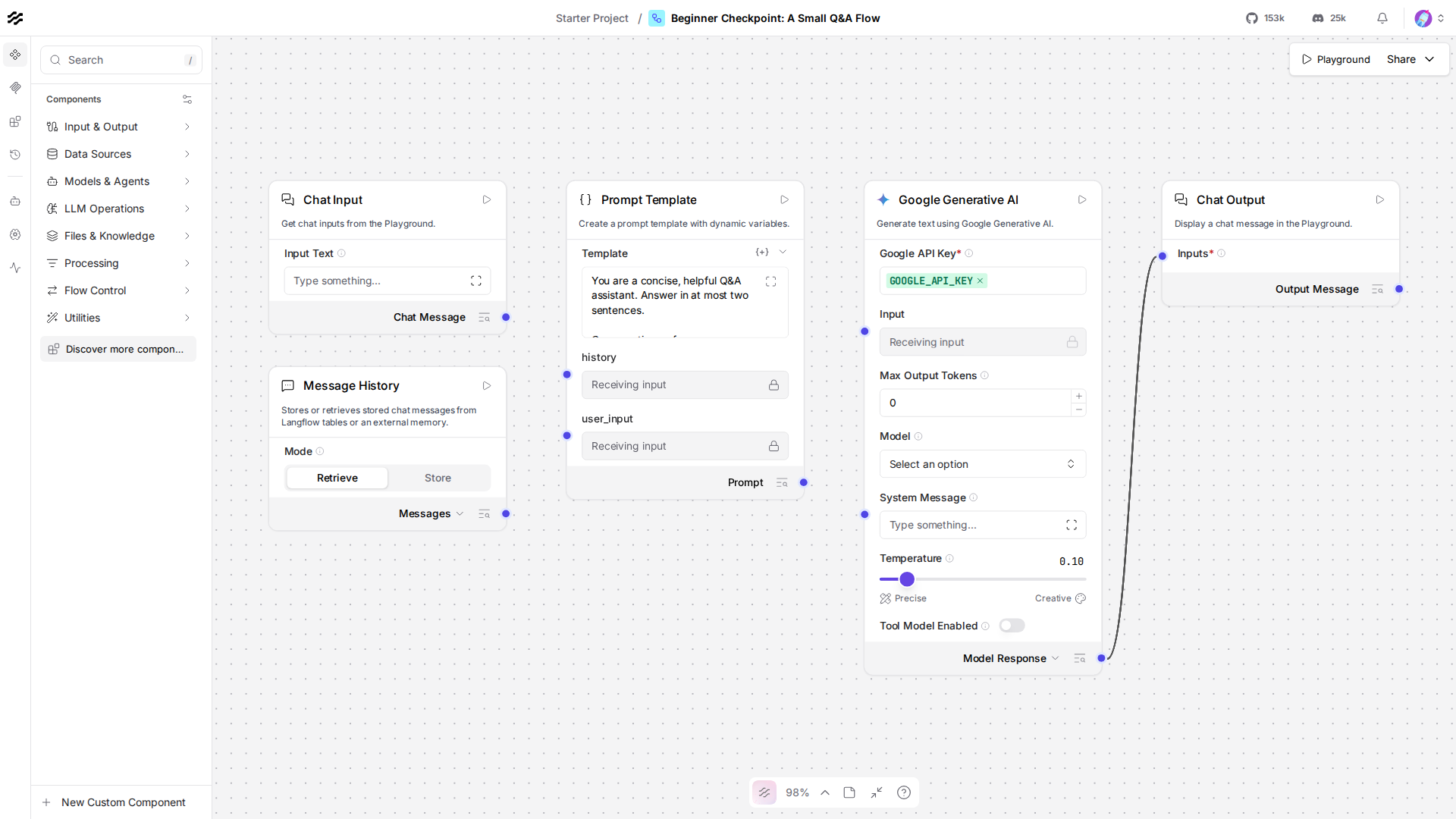
Every piece from Beginner, in one flow: a Prompt Template with a system instruction and two variables, a real Google Generative AI component whose API key comes from a Global Variable, and Message History giving it memory across turns. Ask it something, then ask a follow-up that only makes sense if it remembers the first answer.
Do this yourself
Build the flow fresh, from an empty canvas, no reopening an earlier lesson this time:
- Chat Input, Session ID set to a fixed string.
- Message History, Mode
Retrieve, same Session ID. - Prompt Template, with
{history}and{user_input}variables, and an instruction of your own choosing ("answer concisely", "answer like a pirate", whatever you'd like) written directly into the template text. - Google Generative AI, model
gemini-3.5-flash-lite, API key picked from theGOOGLE_API_KEYGlobal Variable, not typed in. - Chat Output, same Session ID as Chat Input.
- Wire it exactly like Lesson 8's flow: Chat Input's message and Message History's retrieved text both into the Prompt Template, Prompt Template's output into the model, the model's output into Chat Output.
In the Playground, ask a question, then ask a follow-up that only makes sense with memory of the first ("How tall is it, in meters?" after asking about a mountain). Confirm it actually follows up correctly. Compare to this screenshot of this flow:
Try this yourself
- Change the Prompt Template's instruction (concise, verbose, a specific persona) and confirm the model's answers actually reflect it, that's the same lever Lesson 4's pirate voice used.
- Ask a three-turn conversation instead of two, confirm the model still has the full history on the third turn, not just the message right before it.
- Remove the
api_key="GOOGLE_API_KEY"/load_from_db = Truelines and hardcode your key as a literal string instead, confirm it still runs, then put the Global Variable reference back, this is the concrete difference Lesson 7 was about.
If you can make these changes confidently, you're ready for the Intermediate tier, starting at Lesson 10.